Showing posts with label Tax. Show all posts

Friday, 11 March 2022

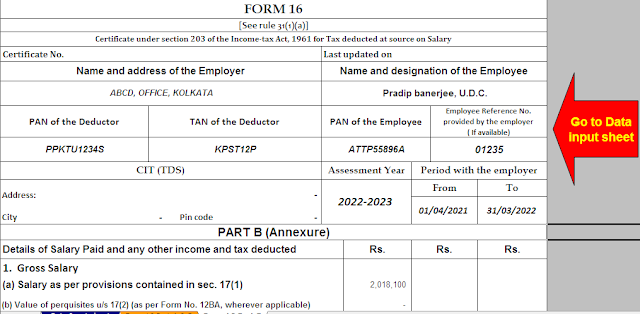
Download and Prepare Automatic Income Tax Salary Certificate Form 16 for the F.Y.2021-22

 Download and Prepare Automatic Income Tax Salary Certificate Form 16 for the F.Y.2021-22 | Form

 16 is a certificate issued under Section 203 of the Income Tax Act 1961 for tax deducted at the source

 (TDS) from income under the head's "salary." It is issued when the tax is deducted by the employer

 from the employee's salary and deposited with the government. The certificate provides a detailed

 summary of the amount paid or credited to the employee and the TDS for it. This form is issued

 annually under the provisions of the Income Tax Act (I-T Act) usually after the end of the fiscal year

 for which it was issued. The employer must issue the certificate to the taxpayer if tax has been

 deducted from the salary by the employer.

Download and prepare One by One Income Tax Form 16 Part A&B for the F.Y.2021-22

Form 16

Form 16 helps an individual to easily register in the International Telecommunication Register as it facilitates access to information regarding salary and tax exemption available to him. A TDS certificate consists of two parts: Part A and Part B. Keep in mind that both parts must have the TRACES logo on them. 

What is Part A of Form 16?

Part A of Form 16 consists of the details of the tax deducted at the source on the salary. It is created and downloaded from the TRACES portal by the employer. 

 Income Tax Form 16 Part A

1 Part A of Form 16 includes the following:

2 Name and address of the employer

3 PAN (Permanent Account Number) and TAN for the employer

4 Pan employee

5 Summary of the amount paid or credited and the tax withheld at source as stated in relation to the employee

Download and prepare One by One Income Tax Form 16 Part B for the F.Y.2021-22


Form 16

What is Part B of Form 16?

It is a supplement to Part A of Form 16 that must be issued by your employer.

Part B of Form 16 includes: 

1 Detailed salary distribution

2 Income tax provisions to the extent that they are exempt from tax under Section 10

3 Allowable deductions under Chapter VI-A of the Income Tax Act such as Section 80C, 80D, etc.

4 Any other deductions such as the standard deduction available to salaried employees.

5 Reliefs under Section 89 

Download and Prepare Automatic Income Tax Salary Certificate Form 16

Download and prepare at a time 50 Employees Form 16 Part A&B for the F.Y.2021-22


Download and Prepare Automatic Income Tax Salary Certificate Form 16

What do you do when you work with one or more employers?

If you have worked with one employer during the fiscal year, the employer will issue Form 16 for the full fiscal year. It will include details of tax withheld and deposited for all quarters of the fiscal year.


If you have worked with more than one employer during the fiscal year, each of the employers will issue Form 16 for the period in which you worked with each of them. However, Part B of Form 16 may be issued by either the employer or the latter employer at the choice of the taxpayer.


Under current rules, the deadline for employers to issue Form 16 is June 15 each year. Provisions in the Income Tax Act make it mandatory for an employer to issue Form 16 to his employee if TDS tax is deducted from his or her salary.


You should also know that if the employer is late or does not issue Form 16 by the given date, he will be liable to pay a fine of Rs 100 per day until the date the default continues. However, the fine must not exceed the amount of the withholding tax.

Download and prepare at a time 50 Employees Form 16 Part B for the F.Y.2021-22

Download and Prepare Automatic Income Tax Salary Certificate Form 16

Download and Prepare Automatic Income Tax Salary Certificate Form 16


Tuesday, 24 November 2020

Automated Income Tax Calculator All in One for the Andhra Pradesh State Employees for F.Y.2020-21 as per U/s 115 BAC


All the taxpayers are known that the new system introduced in Budget 2020 U/s 115 BAC For the F.Y.2020-21. In this method you'll choose your option as Old Tax Slab or New Tax Slab U/s 115 BAC.

Tax Slab for the F.Y.2020-21

In this regard, you want to know your Tax that you simply shall be paid to the government for the fiscal year 2020-21 and Assessment Year 2021-22. As per the Section 115 BAC you'll choose your option within the PRESCRIBED FORM 10-IE as New or Old tax Regime. When you submit your tax Details to your Employer or Dedicator, you want to mention your Option as New or Old Tax Regime.

Look about the new section 115 BAC:-

1) If you select A New Tax Regime then you'll not entitle any tax Benefits as per tax Act 1961 and also, you'll not get the Old Tax Slab as before the F.Y.2019-20. But you will get only one Tax Benefits for NPS (Pension Scheme) U/s 80CCD. Follow the below the New tax Slab Rate Chart for the F.Y.2020-21 as New Tax Regime.

2) If you select A Old Tax Regime then you'll get the all tax Benefits as per the tax Act 1961,and you'll avail the Old Income Tax Slab Rate as per the F.Y.2019-20. You can get all the tax Sections benefits if you select the Old Tax Regime. Follow the below the New tax Slab Rate Chart for the F.Y.2020-21 as New Tax Regime.

You may check your Income To Tax Liability by the Unique & Most popular Excel Based Income Tax Software All in One where from you know your Total Tax Burden as New and Old Tax Regime (As per your Option) This Excel Based tax Preparation Software for the Andhra Pradesh State Employee.

This Unique Software All in One prepare at a time your


1) Income Tax Computed Sheet as per your Option New or Old Tax Regime


2) Individual Salary Structure as per the Andhra Pradesh StateEmployee’s Salary Pattern


3) This Excel utility prepares and calculates your income tax as per the New Section 115 BAC (New and Old Tax Regime)


4) This Excel Utility has an option where you can choose your option as New or Old Tax Regime


5) Automated Income Tax Arrears Relief Calculator U/s 89(1) with Form 10E from the F.Y.2000-01 to F.Y.2020-21 (Update Version)


6) Automated Income Tax Revised Form 16 Part A&B for the F.Y.2020-21


7) Automated Income Tax Revised Form 16 Part B for the F.Y.2020-21


8) Individual Salary Sheet


9) Auto Calculate your House Rent Exemption Calculation U/s 10(13A)

Sunday, 22 November 2020

Auto Calculate Income Tax All in One for Govt and Private Employees for F.Y.2020-21 as per New and Old Tax Regime U/s 115BAC


In the Budget 2020 introduced a new Section 115 BAC for the F.Y.2020-21. This Section 115BAC have an option that you can stay in the Old Tax System along with all the Income Tax Exemptions as per the F.Y.2019-20 and you can Opt in the New Tax Regime Excluding any Exemptions of Income Tax as the previous F.Y. 2019-20 as clearly mentioned in the Budge 2020 U/s 115BAC.


As per the Budget the New Tax Slab is given below U/s 115BAC which introduced in the Budget 2020.


Income Tax Slab for the F.Y.2020-21

Also it is clear that no relaxation to the Senior Citizen in the New Tax Slab as per U/s 115BAC ( New Tax Regime). We Prepared a Unique Income Tax Preparation Excel Based Software only for the Govt and Private  Employees for the F.Y.2020-21 as per the new Budget 2020 with New and Old Tax RegimeU/s 115BAC introduced in the Budget 2020.

As per the New Income Tax Section 115 BAC introduced in Budget 2020. As per the Section 115 BAC you should give your option as you opt-in as New Tax Regime or Old Tax Regime in the newly prescribed Form 10-IE. If you choose the New Tax Regime you can not avail this exemption U/s 80 TTA or if you choose the Old Tax Regime then you can avail this Exemption U/s 80 TTA.  

Download Automated Income Tax Preparation Excel Based Software All in One for the Government & Non- Government (Private) Employees for the F.Y.2020-21As per New Section 115 BAC (New and Old Tax Regime)

Income Tax Calculator for F.Y.2020-21

Feature of this Excel Utility:- 

1) This Excel utility prepares and calculates your income tax as per the New Section 115 BAC (New and Old Tax Regime)


2) This Excel Utility has an option where you can choose your option as New or Old Tax Regime


3) This Excel Utility has a unique Salary Structure for Government and Non-Government Employee’s Salary Structure.


4) Automated Income Tax Arrears Relief Calculator U/s 89(1) with Form 10E from the F.Y.2000-01 to F.Y.2020-21 (Update Version)


5) Automated Income Tax Revised Form 16 Part A&B for the F.Y.2020-21


6) Automated Income Tax Revised Form 16 Part B for the F.Y.2020-21


7) Individual Salary Sheet

Auto Calculate Income Tax All in One for Govt and Private Employees for F.Y.2020-21 as per New and Old Tax Regime U/s 115BAC


In the Budget 2020 introduced a new Section 115 BAC for the F.Y.2020-21. This Section 115BAC have an option that you can stay in the Old Tax System along with all the Income Tax Exemptions as per the F.Y.2019-20 and you can Opt in the New Tax Regime Excluding any Exemptions of Income Tax as the previous F.Y. 2019-20 as clearly mentioned in the Budge 2020 U/s 115BAC.


As per the Budget the New Tax Slab is given below U/s 115BAC which introduced in the Budget 2020.

 Income Tax new and old tax slab U/s 115BAC For F.Y.2020-21


Also it is clear that no relaxation to the Senior Citizen in the New Tax Slab as per U/s 115BAC ( New Tax Regime). We Prepared a Unique Income Tax Preparation Excel Based Software only for the Govt and Private  Employees for the F.Y.2020-21 as per the new Budget 2020 with New and Old Tax RegimeU/s 115BAC introduced in the Budget 2020.

As per the New Income Tax Section 115 BAC introduced in Budget 2020. As per the Section 115 BAC you should give your option as you opt-in as New Tax Regime or Old Tax Regime in the newly prescribed Form 10-IE. If you choose the New Tax Regime you can not avail this exemption U/s 80 TTA or if you choose the Old Tax Regime then you can avail this Exemption U/s 80 TTA 

Download Automated Income Tax Preparation Excel Based Software All in One for the Government & Non- Government (Private) Employees for the F.Y.2020-21As per New Section 115 BAC (New and Old Tax Regime)

Income Tax Calculator for the F.Y.2020-21

Feature of this Excel Utility:-


1) This Excel utility prepares and calculates your income tax as per the New Section 115 BAC (New and Old Tax Regime)


2) This Excel Utility has an option where you can choose your option as New or Old Tax Regime


3) This Excel Utility has a unique Salary Structure for Government and Non-Government Employee’s Salary Structure.


4) Automated Income Tax Arrears Relief Calculator U/s 89(1) with Form 10E from the F.Y.2000-01 to F.Y.2020-21 (Update Version)


5) Automated Income Tax Revised Form 16 Part A&B for the F.Y.2020-21


6) Automated Income Tax Revised Form 16 Part B for the F.Y.2020-21


7) Individual Salary Sheet

Saturday, 2 May 2020

Simplify Your Income Tax Return Filing Process for F.Y.2019-20 With Automated Income Tax Revised Form 16 Part A&B and Part B for the F.Y.2019-20


Many individuals procrastinate whilstit comes to submitting their income tax returns, particularlyfolks who are filing their tax returns for the first time. All character taxpayers having a total income of morethan Rs. 2.5 lakh (Rs. three lakh for senior residents and Rs. five lakh for brilliant senior residents) are required to report the earnings tax returns on or earlier than the due date. Even if it isn't always obligatory for you, filinga "Nil Return" can help you set matters on therecord. The following are a number of the suggestions to ensurewhich you are filing your tax return effectivelyand in a hassle-unfastened manner.

Download Automated Income Tax Revised Form 16 Part B for the Financial Year 2019-20 [ This Excel Based Software can prepare at a time 100 employees Form 16 Part B in revised format]

Have your PAN and Aadhaar card equippedFirst, ensure which you have your PAN and Aadhaar card handyto go into the info at the same time as submittingthe ITR. You will also want to quote your date of birthand father's name similar to that mentioned in the PAN card. Moreover, when you have no longer carried out for an Aadhaar card yet, make certain you do that earlier than filingyour earnings tax return.

Collect Form sixteen makes it less difficultfor you to record the profits tax return as itcontains a maximum of the important information. Generally, an employerpresents it to every worker by means of May 31st of each year. If you have got laboured for extra than one companyat some point of a monetary year, you want to get Form 16from every organization.

Get your financial institution assertion It is compulsory to say your financial institution account information whilstfiling your profits tax go back. Additionally, having your bank statements on hand allows you to say the entire hobby amount collected in an economicyear (April 1 to March 31) from your financial savings account. Under segment80TTA, savings financial institution interest as much as Rs. 10,000 can be claimed as a tax deduction.


Use Form 26AS Form 26AS suggests details of the tax credit for your PAN like tax deducted at source (TDS), Tax accumulated at sources (TCS) on your earnings like from fixed deposit, commission, salary, etc. And taxes deposited with the aid of the assessee. As the tax is already deducted from your profits, you mayregulate the TDS from the total tax which you are vulnerable to pay. Most importantly, ensure that to consist of the informationof the corresponding profits on which tax is deducted for your profitstax return. Because, in case you claim TDS and do now not include the related income, you can get a tax notice.

Gather evidence of investments For a few reasons, if you were now not capable of declaring investments to your employeror offer the specified proofs, such deductions will additionallyno longer seem for your Form 16. You can claimtax deductions for any eligible investments made before the endof the monetary year, lowering your total taxable incometo that extent. Hence, make sure to consist of all such investments on the time of submitting your income tax go back.

Download Automated Income Tax Revised Form 16 Part A&B for the Financial Year 2019-20 [ This Excel Based Software can prepare at a time 100 employees Form 16 Part A&B in revised format]


Get details of your belongings If your taxable earningsexceeds Rs. 50 lakh after claiming all the deductions, you will needto mention some additional facts in your earningstax return. Some of the additional declarations that you wantto make encompass the price of movable and immovable belongings, coins in hand, jewellery, and liabilities (if any). You will needto say these information in Schedule AL for your earningstax return.

Filing your income tax return does now not most effective make you financially responsible, however it also facilitatesyou determine whether you're moving in the direction ofachieving your monetary goals. By submitting your ITR on time, you can additionally take gain of tax-saving investments and avoid a penalty for late filing of profitstax returns. Moreover, it offers a clear photo of your totalincome which you earned in a economic year. Get your Income Tax Returns filed the right way.

Friday, 13 September 2019

Income Tax Exemption From P.P.F. For F.Y. 2019-20 With Automated Income Tax Form 16 Part B for F.Y. 2018-19

PPF (Public Provident Fund) is a standout amongst the most famous and likely a standout amongst the best speculation alternatives in India. Also, properly so as a result of the highlights, tax reduction and nearly chance free returns that it offers.

Who can Open PPF Account?

1.         Any native of India regardless of Income Source can open PPF Account.

2.         NRIs can't open PPF account nor would they be able to expand their current PPF after development. Anyway, through a warning in July 2003, they are permitted to keep on making a store to the current record they opened before getting to be NRIs.

3.         HUFs are never again permitted to open PPF accounts.

4.         No joint holding is permitted in PPF. The record must be opened in a single name.

Could PPF Account be opened for Minors?

PPF Account can be opened for minors under the guardianship of the parent. Both of the parent (spouse or wife) can be the gatekeeper of the kid.

Who can Open PPF Account?

1.         Any native of India regardless of Income Source can open PPF Account.

2.         NRIs can't open PPF account nor would they be able to expand their current PPF after development. Anyway, through a warning in July 2003, they are permitted to keep on making a store to the current record they opened before getting to be NRIs.

3.         HUFs are never again permitted to open PPF accounts.

4.         No joint holding is permitted in PPF. The record must be opened in a single name.

Will PPF Account be opened for Minors?

PPF Account can be opened for minors under the guardianship of the parent. Both of the parent (spouse or wife) can be the watchman of the tyke.

How to open PPF Account?

PPF record can be opened in Post Offices and the accompanying banks:
Allahabad Bank
Corporation Bank
Syndicate Bank
Andhra bank
Dena Bank
UCO Bank
Bank of Baroda
IDBI Bank
Union Bank of India
Bank of India
Indian Bank
United Bank of India
Bank of Maharashtra
Indian Overseas Bank
Vijaya Bank
Canara Bank
Punjab National Bank
ICICI Bank Ltd
Central Bank of India
State Bank of India

PPF account in most of the banks can now also be operated online.
Now and again banks may not be quick to open PPF account as they don't get the chance to utilize the cash. The promptly exchange the cash to RBI. They just get a commission on the sum gathered. So banks attempt to offer you items which are increasingly beneficial for them.

Download Automated Income Tax Form 16 Part B for f.Y. 2018-19 [ This Excel Utility can get ready at once 50 Employees Form 16 Part B]


Financing cost on PPF:

1.         The financing cost is set apart to the normal Government security yields and would be informed toward the start of each quarter. This change is powerful from April 1, 2016. The financing cost as of FY 2016-17 (January to March) is 8.0% (The loan cost is fixed 0.25 percent over the 10-year government security yield)

2.         The intrigue is exacerbated every year and is credited to the record toward the finish of the budgetary year.

3.         The enthusiasm for PPF is determined on least harmony between fifth to the most recent day of the month. So you should make your venture before the fifth of the month or it would not get enthusiasm for the month.

Best Features of PPF:

1.         PPF has a sovereign certification which means the primary and intrigue is ensured by the Government of India. This makes its Credit chance right around zero!

2.         PPF can't be joined by courts or government under any conditions.

3.         The duty on PPF is EEE (Exempt-Exempt-Exempt) which implies that there is tax break when speculation is made, there is no assessment when the venture wins premium consistently and there is likewise no expense when the speculation is pulled back on development.

4.         The interest in PPF up to Rs 1,50,000 is exempted from pay charge u/s 80C.

Download Automated Income Tax Form 16 Part A&B for the F.Y. 2018-19 [ This Excel Utility Can Prepare at once 50 Employees Form 16 Part A&B]


Withdrawals from PPF:

The withdrawal from PPF relies upon the quantity of years the record has been dynamic:

         The whole sum can be pulled back on fulfillment of 15 years

         The first withdrawal can be produced using seventh year of record being opened

         The most extreme that can be pulled back in any year is least of (half of parity at end of 4 years or half equalization at end of earlier year)

         Only one withdrawal can be made in one money related year

Untimely Closure of PPF:

Compelling April 1, 2016 untimely conclusion of PPF would be permitted in extraordinary cases, for example, instances of genuine disease, advanced education of youngsters and so forth. This will be allowed with a punishment of 1% decrease in intrigue payable in general store and just for the records having finished five years from the date of opening.

Credit against PPF:

You can take credit against PPF balance dependent on the accompanying conditions:

         Loan must be taken between third year to sixth year of opening record

         The intrigue would be 2% more than the overarching loan fee on PPF

         The reimbursement period is two years. The advance can be either paid month to month or in single amount

         The most extreme credit sum is 25% of the sum that was available 2 years back going before to the present advance date

Expansion of PPF Accounts:

The PPF record can be stretched out by a square of 5 years after consummation of mandatory locking time of 15 years. There is no constraint on number of times expansion is looked for. After fruition of clench hand 5 years augmentation, a crisp solicitation might be given for further expansion. So you can keep a PPF account dynamic uncertainly.

There can be two sort of expansion demand:

1.         Extension without commitment – The parity in the record will keep on winning enthusiasm at the predominant rate still the conclusion of record. On the off chance that the record is stretched out without commitment, any sum can be pulled back without limitations just once consistently.

2.         Extension with commitment – for this situation withdrawal up to 60% of the equalization toward the start of each all-inclusive period (square of five years) is permitted.


What occurs after Demise of PPF holder?

1.         Nomination office is accessible for PPF Account. Infact it's obligatory to fill your selection while opening PPF account

2.         The PPF record can be shut on downfall of the record holder even before culmination of 15 Years and the sum is given to the chosen one

3.         The other alternative is to give the record a chance to stay open till development. It will keep on gaining interest yet no further commitment can be made to the record

4.         If no Nomination was made, the sum would be passed to the legitimate beneficiary

Confinements of PPF Account:

1.         One Person can just open one PPF Account. On the off chance that extra record is discovered, no intrigue would be paid on that.

2.         The point of confinement for store on PPF has been expanded to Rs 1.5 Lakhs every year from Budget 2014. In the event that you figure out how to store more than that in money related year, no premium would be paid on that.

3.         You need to put least of Rs 500 out of a money related year.

4.         On non-store of at any rate Rs 500 out of a money related year the record is stopped. The ended PPF account keeps on acquiring interest.

5.         To resuscitate the ceased PPF account, you have to pay punishment of Rs 50 every time of non-installment alongside the store of Rs 500 for each missing installment year.

6.         The store ought to be in various of Rs 10. You can't store Rs 501 however store Rs 500 or Rs 510.

7.         You can make limit of 12 stores in a money related year. It need not really be month to month.


8.         The above utmost of Rs 1.5 lakh every year is on an individual and not on record which implies the complete speculation limit considers the aggregate of cash saved in possess PPF account and other record in which you are the watchman. For e.g.if you have one PPF account on your name and another PPF account on your minor kid name with you as the watchman. So to compute your absolute store restrain you have to include interest in both the records. So for all down to earth reason the two records are viewed as one.

Wednesday, 26 December 2018

A Complete Guide to Tax Exemption for Financial Year 2018-19, With Automated Master of Form 16 Part B for F.Y.2018-19

Tax planning is overwhelming for most of us. With the complex network of various sections, sub-sections, and provisions, it is crucial to completely understand tax provisions are applicable to you, and what can work for or against you. If you are losing your sleep over your taxes, look no further. We bring to you a complete guide to tax exemption for the financial year 2018-19.
Budget 2018 has created a significant impact on personal finance, in respect of investments, savings, and taxes. It is important to think beyond Section 80C to maximize your income tax benefits. Also, you must align your investments with your tax-saving instruments to get absolute benefits.
Here we have a complete list of tax deductions you can claim under the Income Tax Act, this financial year 2018-19.

Section 80C – Investments

There are approximately 14 instruments through which you can claim a deduction under Section 80C. Financial instruments like Employee Provident Fund, National Savings Certificate, Public Provident Fund, National Pension System, payment made towards children’s tuition, Life Insurance premium, ELSS, deposit in Sukanya Samriddhi Yojana, etc offer tax benefit under this section.
A deduction of Rs.1,50,000 from your total income in FY 2017-18 can be claimed by an individual or a HUF, u/s 80C.

Section 80CCD – Government Pension Scheme

Under this section, you can claim a deduction for a contribution made towards National Pension Scheme.
Section 80CCD (1) – Employee’s Contribution –
If you are an employee: Maximum deduction allowed is 10% of your salary.
If you are self-employed: Maximum deduction allowed is 20% of your gross total income.

Download  and Prepared at a time 100 Employees Automated Form 16 Part B For the Financial Year 2018-19 & Ass Year 2019-20 [ This Excel Utility Can Prepare at a time 100 employees Form 16 Part B ]

 Section 80CCD (1B) – Self contribution 

An additional deduction of up to Rs.50,000 for investment in a Tier I NPS account. The contribution made towards Atal Pension Yojana is eligible as well.
Section 80CCD (2) – Employer’s Contribution –
An additional deduction of up to 10% of the salary of the employee, towards contribution made to employee’s pension fund. No financial limit exists on this deduction.

Section 80D – Health Insurance

Tax benefit u/s 80D of Rs.50,000 shall be available for senior citizens.
If you pay a premium for a Health Insurance, on behalf of your parents, an additional deduction of up to Rs.20,000 (Rs.50,000 (less) Rs.30,000) shall be available. If you fall under the tax bracket of 30%, you shall be eligible for an additional tax benefit of up to Rs.6,000 (30% of Rs.20,000).
In the case of super senior citizens (aged above 80 years) who are uninsured, a medical expense of up to Rs.30,000 shall be allowed as a deduction.

Section 80DDB – Critical Illness

Under section 80DDB tax deduction of Rs.40,000 is available, for medical treatment of specified ailments, for individuals below 60 years of age. These specified ailments include AIDS, Cancer, Thalassaemia, etc.
Rule 11DD has the list of these specified ailments. A certificate from a registered doctor, in Form 10I, will have to be furnished.
Tax exemption on treatment expense of specified critical illness was ₹60,000 for senior citizens and Rs.80,000 for very senior citizens. This limit has been proposed to be increased to Rs.1,00,000 for all senior citizens.
If an expenditure has been incurred by you for treatment of your senior citizen parents, for a specified ailment, ad additional tax deduction of Rs.40,000 can be claimed.

Download& Prepare at a time 50 Employees Form 16 Part B for the Financial Year2018-19 [ This Excel Utility Can Prepare At a time 50 Employees Form 16 Part B ]


Section 80TTA – Savings Account

Interest earned on Savings Account in post office, bank, or cooperative society, shall be exempt up to Rs.10,000.
Interest earned from this account will have to be included in Other Income. Deduction claimed will have to be on the total interest earned or Rs.10,000, whichever is less. This benefit is available for an individual and a HUF.
This tax benefit is not allowed on interest earned via Recurring Deposits, Fixed Deposits, or Corporate Bonds.

Section 80GG – HRA

If you are residing in a rented house, HRA is an excellent tax saving option for you. The tax benefit you will be able to avail would depend on your Basic Salary, the HRA that has been provided by your employer, the rent you pay, and your place of residing.

Section 80G – Charity & Relief Funds

Tax exemption of up to 50% of the amount paid via cash, draft, or cheque (up to Rs.10,000), towards a charitable organization or relief fund can be claimed. Contribution towards specified organizations makes you eligible for 100% tax exemption.
W.e.f FY 2017-18, a donation in cash, in excess of Rs.2,000, shall not be allowed as a deduction. A donation made above Rs.2,000 will have to be made in any mode other than cash, to avail tax benefit.

Section 80GGB – Political Party Contribution

In respect to this section, “Political Party” refers to a political party registered u/s 29A of Representation of the People Act.
100% tax exemption is available under this section on the contribution made by a company toward an electoral trust or political parties, under section 80GGB.

Section 80E – Education Loan

Interest paid on loan for higher education post completion of your Senior Secondary Examination shall be eligible for a tax deduction claim under this section. This benefit shall be allowed on loan taken for higher education of yourself, your spouse, your children, or a student for whom you are a local guardian.
Tax deduction under this section can be availed for up to 8 years or till the payment of interest, whichever is earlier. No limit has been set on the amount of interest.

Standard Deduction of Rs.40,000

A standard deduction of Rs.40,000 has been introduced for employees. You will have to forego the transport allowance with deduction Rs.19,200, and medical reimbursement with deduction Rs.15,000.
This standard deduction will provide a benefit of Rs.5,800 (Rs.40,000 (less) Rs.34,200)

Section 24(b) – Home Loan

You can claim a tax benefit on the interest component of your home loan u/s 24(b). In case of properties that are self-occupied, deduction of up to Rs.2,00,000 shall be applicable.