Showing posts with label Section 89(1). Show all posts

Sunday, 4 December 2022

Arrears Salary Relief Calculator A.Y 2023-24 for claiming relief u/s 89(1) in Excel

 Arrears Salary Relief Calculator A.Y 2023-24 for claiming relief u/s 89(1) in Excel|A.Y 2023-24 (F.Y

 2022-23) Calculator of arrears of pay for claiming deduction under section 89(1) of the Income Tax

 Act 1961-Download


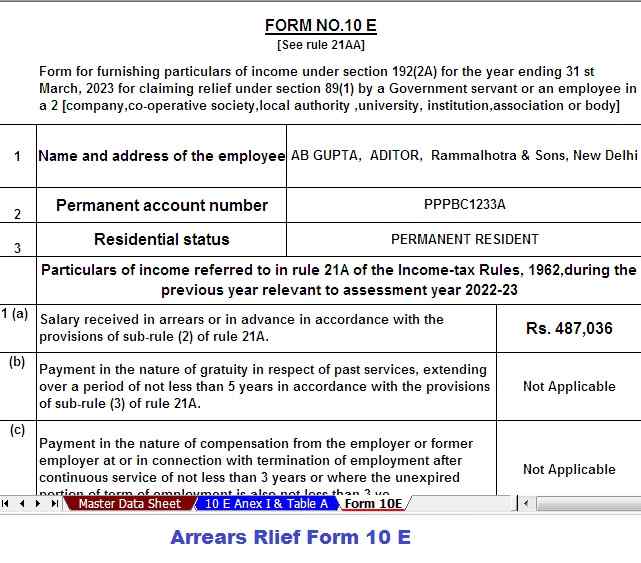
In accordance with Section 89(1) of the Income Tax Act, a reduction in income tax was granted in 1961 when an employee receives an overdue or prepaid salary during the financial year. UnderRule 21AA of the Income Tax Rules, 1962, Form 10-E is filed for claiming the deduction.


According to the Act, if the employee is a government employee or is an employee of a society, cooperative, local government, university, institution, or body association, to claim exemption, the employee can submit his Form 10E her his responsible employer of payment of compensation as provided in Article 192, first paragraph, of the Income Tax Act, 1961


In all other cases, the valuer requesting the exemption requests it on Form 10E from his tax advisor. Relief under Section 89, paragraph 1, is allowed in the assessment year in which the employee receives arrears or advances.


Especially in the public sector, pay revisions have become more common. Since independence, six pay committees have been formed by the government so far. The retroactive recommendations of the committee have all resulted in salary delays. The rationale behind granting this exemption under section 89 is that as a result of payment of arrears or advances received by him in a particular financial year, the income of the employee for that financial year increases due to the amount of arrears or advances . . . . As a result, the employee's income is taxed at a higher rate than the income would have been taxed if no such advances or expenses had been incurred.


The steps involved in calculating the Article 89(1) exemption are essentially as follows:


First, expand the amount of arrears or advances received to the specific relevant financial year and recalculate the income tax for each year if the arrears were incurred in the same relevant financial year.


Then calculate the income tax for each of the fiscal years irrespective of arrears or advances received.


Third - removal of total income tax arrived at the 2nd stage of stage-1.


Fourth, you calculate the income tax for the financial year incurred by the arrears, including arrears/advances.


Fifth: compute the income tax for the financial year in which the arrears were collected, less arrears/advances.


Income tax of the sixth deduction reached stage 5 of income tax reached stage-4


Sixth - deduction of income tax reached stage-3 of income tax reached stage-6


The amount so entered is the amount of the deduction under section 89 (1).

DownloadAutomated Income Tax Arrears Relief Calculator U/s 89(1) along with Form 10E from the Financial Year 2000-01 to Financial Year 2022-23 (Up-to-date Version)

Arrears Salary Relief Calculator A.Y 2023-24

Arrears Salary Relief Calculator A.Y 2023-24


Thursday, 4 August 2022

Download Automatic Arrears Relief Calculator U/s 89(1) with Form 10 E for the F.Y.2022-23

 What is Section 89?

Download Automatic Arrears Relief Calculator U/s 89(1) with Form 10 E | For the purposes of the Income Tax Law, income tax is levied on the total income earned or received during the previous year by the taxable person. There are cases when past debts are paid to an employee in the current year as salary arrears. In this case, the income tax payable by the employee will in this case be higher in the current year. This may be due to a change in the flat rate applicable to the taxpayer, in connection with which his flat rate will change to a higher tax rate.


The Section 89 tax credit allows us to deal with this situation. Provides for an exemption if the employee is in a higher tax bracket at the time of receiving money for previous years.


How to calculate the tax exemption under section 89(1) for wage arrears?

Below are the detailed steps for calculating Section 89 assistance:


Step 1: We need to calculate the tax due on all income, including income owed in the year it was received.


Step 2: Calculate the tax payable on total income, excluding income owed in the year of receipt. As evidence, the employer provides the employee with an overdue document, which will indicate the additional amount received. This amount must be deducted from the total salary as stated on the worker's Form 16. The calculation of the tax would give us responsibility in case there were no delays.


Step 3: Calculate the difference between steps 1 and 2. This will be the additional payroll tax included in your total income.

Step 4: Calculate the tax payable for each previous year to which additional delays apply:


By total income, including additional debt

By total income without additional debt

Step 5: Calculate the sum of the difference between the amount calculated in step 4. This will calculate the actual tax liability for any previous years for which arrears were received in the current year.


Step 6: The amount in excess of step 3 over step 5 will be the amount of the tax exemption allowed by section 89. If there is no excess, no exemption is allowed. If the tax calculated in step 3 is less than the tax calculated in step 5, the employee does not need to apply for an exemption under section 89. 

Download Automated Excel Based Income Tax Salary Arrears Relief Calculator U/s 89(1) with Form 10E from the Financial Year 2000-01 to the Financial Year 2022-23 (Updated Version)

Download Automatic Arrears Relief Calculator U/s 89(1)

Income Tax Form 10E

Sunday, 6 February 2022

Rebate and Reliefs under income tax along with Auto Calculate Income tax Preparation Software All in One for the Govt and Non-Govt Employees for F.Y.2021-22

Rebate under section 87A of the Income Tax Act is a provision that helps taxpayers to reduce their tax liability.


This section is available to the person whose income does not exceed Rs. 5 Lakhs. The tax liability of a person becomes nil if he claims a rebate under section 87A.


HOW TO CALCULATE TAX REBATE UNDER SECTION 87A

Rebate and Reliefs under income Tax Act

Step 1: Calculate your gross total income for the financial year.


Step 2: After that decrease your tax deduction for investment or tax savings etc.


 Step 3: Get your total income after decreasing the tax deduction.


Step 4: File your income tax return which declares your gross total income. Step 5: Claim rebate under section 87A if your total income is not exceeding Rs 5 Lakhs. Step 6: Maximum limit for claiming a rebate for the financial year 2020-2021 is Rs 12,500.


ELIGIBILITY FOR CLAIMING REBATE UNDER SECTION 87A

The taxpayer person can claim a rebate if the following conditions are satisfied: If the person is a resident individual. If the persons' total income does not exceed Rs 5 Lakhs after deducting all the deductions under Chapter VI-A. The maximum limit for claiming a rebate is Rs 12,500 and an important note is

 the rebate shall be claimed before adding health and educational cess. 

RELIEF UNDER SECTION 89

Income Tax Form 10 E

WHAT IS RELIEF?

Income Tax Act provides provision which is for the taxpayers who is receiving income of the past year in the current year. If anyone is receiving past years due in the current year then he will be worried that he will have to pay extra tax on such income so income tax provides relief under section 89(1) for such person. So basically, the taxpayer will not have to pay extra tax on such extra income which is delayed.


HOW TO CALCULATE TAX RELIEF UNDER SECTION 89(1)

You can calculate tax relief by the following steps:

Step 1: Firstly, calculate your tax payable which is on your total income which shall include your additional income which is received in a year and that will be shown in Part B of Form 16.

Step 2: Now calculate your tax payable on your total income but here your additional income shall be excluded so that you will get the amount of the income which is delayed. Now you have to decrease this amount from the total income, so the calculation will give you the exact amount of tax liability for the year if there were no arrears.


Step 3: Now calculate the differential amount from step 1 and step 2, this will give you the additional amount of tax liability that was due to delay.


Step 4: Now calculate the tax payable on the total income for the year to which the arrear income relates.


Step 5: After that calculate the tax payable on the total income for the year to which the arrear income relate which shall include arrear income.


Step 6: Calculate the differential amount from step 4 and step 5.


Step 7: Excess amount which is left after Step 3 and Step 6 will be your amount of relief under section 89(1). If your amount in step 6 is more than step 3 then you will not get any relief.

Download Automated IncomeTax Preparation Excel Based Software All in One for the Government andNon-Government (Private) Employees for the Financial Year 2021-22 and Assessment Year 2022-23 U/s 115BAC


Salary Structure

Rebate and Reliefs under Income Tax

Income Tax Form 10 E

Feature of this Excel Utility:-


1) This Excel Utility Prepare Your Income Tax as per your option U/s 115BAC perfectly.


2) This Excel Utility has all amended Income Tax Section as per Budget 2021


3) Automated Income Tax Arrears Relief Calculator U/s 89(1) with Form 10E from the F.Y.2000-01 to F.Y.2021-22 (Updated Version)


4) Automated Calculation Income Tax House Rent Exemption U/s 10(13A)


5) Individual Salary Structure as per the Govt and Private Concern’s Salary Pattern


6) Individual Salary Sheet


7) Individual Tax Computed Sheet


8) Automated Income Tax Revised Form 16 Part A&B for the F.Y.2021-22


9) Automated Income Tax Revised Form 16 Part B for the F.Y.2021-22


10) Automatic Convert the amount in to the in-words without any Excel Formula

Saturday, 2 October 2021

Download Auto-Fill Income Tax Preparation Software All in One in Excel for the all State Govt and all Non-Govt Employees for the F.Y 2021-22 (A.Y 2022-23)


Download Auto-Fill Income Tax Preparation Software All in One in Excel for all State Govt and all Non-Govt Employees for the F.Y 2021-22 (A.Y 2022-23) 


Every year taxpayers, especially salaried individuals, wait for the budget in the hope that some tax relief, additional tax deductions or income tax slabs will increase to reduce their total tax expense.

Income Tax Slab Rate for the F.Y.2021-22

You must know which tax system is more beneficial for you. The Budget 2021 has no major income tax, it is more or less the same as in F.Y 2020-21.

You may also, like- All in One Income Tax Preparation Software in Excel for the Andhra Pradesh State Employees for the F.Y.2021-22


Salary Structurre

However, it is necessary to know your tax burden for the F.Y.2021-22 as per Budget 2021. and also know the what is the differences between the old vs. the new tax system.

                Old Tax Regime

   New Tax Regime

It encourages investment in tax saving instruments.

It discourages investments in tax saving instruments.

Existing income tax deductions are allowable.

Major existing deductions are disallowed.

Standard deductions and Professional Tax are deducted from income (Max Rs.52,400).

No deduction is permissible for Standard Deduction & Professional Tax.

The benefit of Housing Loan interest payment is allowed.

Housing loan interest payment is disallowed.

Only 3 tax slabs such as 5%, 20% and 30% are applicable.

6 tax slabs applicable such as 5%, 10%, 15%, 20%, 25% and 30%.

5% Tax rate is basically non-functional.

For every  ₹2.5 Lakh, the tax slab changes by 5%.

A tax rebate of  Rs 12500 is allowed for income up to  Rs 5 Lakh.

A tax rebate of Rs12500 is allowed for income up to Rs. 5 Lakh.

Deductions under Chapter VI-A is allowed.

Deductions under Chapter VI-A are not entitled to be claimed.

This tax regime is more beneficial for income up to  Rs 15 Lakh.

This tax regime is more beneficial for income above Rs.15 Lakh.


What are The main differences between the two existing tax systems are as follows:

Limitations of the new tax system F.Y 2021-22:


Pursuant to Section 115BAC, a taxpayer opting for a new income tax system is not eligible to claim the following income tax deductions:

You may also, like- All in One Income Tax Preparation Software in Excel for the Assam StateEmployees for the F.Y.2021-22


Salary Structure for Assam Employees

Exemption from Travel U / S Section 10 (5);

 H.R.Allowance U / S Section 10 (13A);

Allowances for the income of minors included in section 10 (32);

The standard deduction, entertainment allowance and occupational tax at U / S 16;

U / S 24(B) reduction due to interest on the self-occupied or abandoned home property;

Carrying forward losses and depreciation is no longer allowed to stop;

Deduction under chapter VI-A such as 80C, to 80 CCD(1B).


Calculating income tax sometimes becomes a difficult task. Hence, this Income Tax software in excel for the  F.Y 2021-22 is designed keeping all these aspects in mind.

You may also, like- All in One Income Tax Preparation Software in Excel for the Jharkhand StateEmployees for the F.Y.2021-22


Salary Structure for the Jharkhand Employees

This excel-based calculator can calculate both old and new tax systems. You don't have to do anything extra. After giving details of all your income and deductions and this calculator will automatically calculate your final tax liability under both regimes.


Key Features of Excel Old and New Income Tax Calculator A.Y 2022-23:


It helps you determine which tax system is best for you;

This calculator shows your total tax liability as a percentage of GTI;

You may also, like- All in One Income Tax Preparation Software in Excel for the Bihar StateEmployees for the F.Y.2021-22


Salary Structure for Bihar State Employees

This Excel Based Software is most suitable for salaried people;

This Software can not calculate the long term capital gains tax;


This Excel-based software is password protected to give you the best results;


• Only keep your details in white cells and do not attempt to remove other unused cells to maintain the integrity of the calculator


The 2021 budget is by far the most frustrating for salaried employees. Not changed the tax slabs, or no other tax benefits. The benefits of U / S 80EEA for new home buyers only have been extended for one more year.


The new tax system will be beneficial only when your total income is more than Rs 15 lakh and you will not pay any interest on housing loan U / S 24.

You may also, like- All in One Income Tax Preparation Software in Excel for the West Bengal State Employees for the F.Y.2021-22


Salary Structure for the W.B.State Employees

What is the better tax regime old or new for you?


As can be seen from the comparison table above, the old tax system for annual income up to Rs 15 lakh is more beneficial considering full 80C deduction and Rs 25,000/- 80D deduction.


But the situation changed when the interest on housing was paid at Rs 1 lakh. If no HBL interest is paid, the old tax system will be the absolute winner for each income level, as shown above.


Therefore, if you pay any interest on your housing, you are advised to opt for the old tax system, as it will ensure that your total tax expense will be reduced by at least a little.

Download Automated Income Tax Preparation Excel Based Software All in One for the Government & Non-Government (Private) Employees for the F.Y.2021-22 and A.Y.2022-23

Auto-fill Income Tax software
 
Tax Computed Sheet

Auto-fill Income Tax Software in Excel

Income Tax Form 10 E

Feature of this Excel Utility:-


1) This Excel utility prepares and calculates your income tax as per the New Section 115 BAC (New and Old Tax Regime)


2) This Excel Utility has an option where you can choose your option as New or Old Tax Regime


3) This Excel Utility has a unique Salary Structure for Government and Non-Government Employee’s Salary Structure.


4) Automated Calculate your House Rent Exemption Calculation U/s 10(13A)


5) Automated Income Tax Arrears Relief Calculator U/s 89(1) with Form 10E from the F.Y.2000-01 to F.Y.2021-22 (Update Version)


6) Automated Income Tax Revised Form 16 Part A&B for the F.Y.2021-22


7) Automated Income Tax Revised Form 16 Part B for the F.Y.2021-22